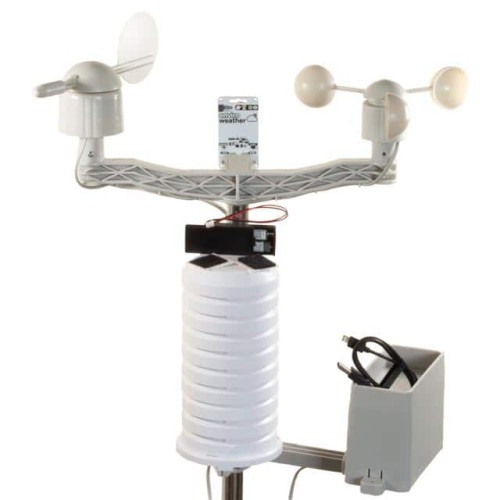
When working with the Pimoroni ENVIRO WEATHER (PICO W ABOARD) (SKU: PIM640), a compact environmental sensor board designed for the Raspberry Pi Pico W, several common failure modes emerge. The most frequent issues include no I2C communication, incorrect or erratic sensor readings, and intermittent power failures. Root causes typically involve poor solder joints on the Pico W headers, incorrect I2C address configuration, or voltage level mismatches when using the board with 5V logic systems. Additionally, the onboard BME280 sensor is sensitive to moisture and physical damage, while the LPS22 pressure sensor can be affected by sudden pressure changes or debris blocking its port.
A step-by-step debugging methodology should start with a visual inspection. Examine the Pico W headers and the ENVIRO WEATHER board's socket for cold solder joints, bridged pins, or bent pins. Use a magnifying glass or USB microscope. Next, verify power: measure the voltage between the 3.3V and GND pins on the Pico W while the ENVIRO board is attached. It should read a stable 3.3V ±0.1V. If it drops below 3.2V, you likely have a short circuit or an overloaded regulator. Then, check I2C communication using a simple I2C scanner script. On the Pico W, typical addresses are 0x76 (BME280) and 0x5C (LPS22). If no devices are found, probe the SDA and SCL lines with an oscilloscope (or logic analyzer) during scanning. You should see clean, square wave pulses with correct voltage levels. If the lines are stuck low, you have a bus contention issue—often due to another I2C device on the same bus with a conflicting address or a pull-up resistor mismatch.
Common mistakes in schematic design and PCB layout often involve incorrect pull-up resistor values for the I2C lines. The ENVIRO board already has 4.7kΩ pull-ups on SDA and SCL. If you add external pull-ups in your circuit, the parallel resistance may drop too low (e.g., 2.35kΩ when using two 4.7kΩ sets), causing weak drive strength and signal integrity issues. Another frequent error is routing I2C traces too close to high-frequency switching lines (like a motor driver or a buck converter), leading to noise coupling and erratic readings. Also, avoid excessive trace length for the sensor lines—keep them under 10cm to minimize capacitance. For the BME280, ensure no large copper pours or ground planes are directly under the sensor's vent hole, as this can affect humidity readings.
To verify component authenticity and quality, start by examining the markings on the BME280 and LPS22 chips. Genuine Bosch BME280s have a distinct laser-etched marking, often "BME280" followed by a batch code. Counterfeits may have smudged or misaligned text. Check the LPS22 for STMicroelectronics branding—look for a small "ST" logo. Use a multimeter in diode mode to measure the forward voltage across the VDD and GND pins of each sensor. A genuine BME280 should show a diode drop of around 0.6V to 0.7V. If you read a short (0V) or an open circuit, the part is likely damaged or counterfeit. Also, compare the quiescent current draw: the ENVIRO board should draw less than 5µA in sleep mode. If it draws 100µA or more, the sensor may be a fake or damaged.
For measurement techniques, use a digital multimeter (DMM) with 1mV resolution for voltage checks. A 4-channel oscilloscope (50MHz minimum) is essential for debugging I2C timing and noise. Set the scope to trigger on the SCL falling edge and capture both SDA and SCL. Look for rise times under 1µs and clean transitions. For humidity readings, use a calibrated hygrometer as a reference. Place the ENVIRO board and the hygrometer in a sealed bag with a salt solution (e.g., 75% RH with NaCl) for 24 hours to verify accuracy. For pressure, compare against a local weather station's barometric pressure (adjusted for altitude). Use a logic analyzer (like a Saleae clone) to decode I2C packets and check for NACKs—a NACK on the sensor's address indicates it's not responding, often due to a power or address issue.
A key decision point is when to suspect the component vs. the surrounding circuit. If the ENVIRO board works perfectly with a known-good Pico W but fails with your custom PCB, the problem is likely in your circuit—check for incorrect voltage levels, missing decoupling capacitors, or noise on the power rail. Conversely, if the board fails with multiple different Pico W units and the I2C lines look clean on an oscilloscope, the sensor itself may be defective. A common case is the BME280 showing fixed humidity readings (e.g., 100% RH)—this often indicates the sensor's humidity membrane has been contaminated or physically damaged. Another symptom: the LPS22 returning the exact same pressure reading regardless of altitude change suggests a stuck internal diaphragm, likely from debris or overpressure.
Real-world case studies illustrate these principles. In one case, a customer reported that the ENVIRO board returned "NaN" for temperature after a week of operation. The root cause was moisture ingress into the BME280 due to the board being mounted in a non-ventilated enclosure. The solution was to add a hydrophobic membrane over the sensor's vent (e.g., Gore-Tex patch) and ensure the enclosure had a small drain hole. Another case involved intermittent I2C failures when used alongside a 433MHz RF transmitter. The issue was RF interference coupling into the I2C lines. Adding a 100pF capacitor from each I2C line to ground (forming a low-pass filter) and twisting the wires solved it. A third case: a prototype with long (30cm) wires from the Pico W to the ENVIRO board caused bus capacitance overload, resulting in clock stretching errors. The fix was to reduce the pull-up resistors to 2.2kΩ and keep the wire length under 15cm.
Finally, always double-check your I2C address. The ENVIRO board uses 0x76 for BME280 and 0x5C for LPS22 by default. If you have another I2C device with the same address, you must change one of them—the BME280 can be reconfigured to 0x77 by bringing its SDO pin high, but on the ENVIRO board this is fixed. In such cases, use an I2C multiplexer (like the TCA9548A) to isolate the boards. Also, ensure your Pico W's I2C pins are correctly assigned: GP4 (SDA) and GP5 (SCL) are the defaults for the ENVIRO board. Using other pins without reconfiguring the firmware will yield no communication.