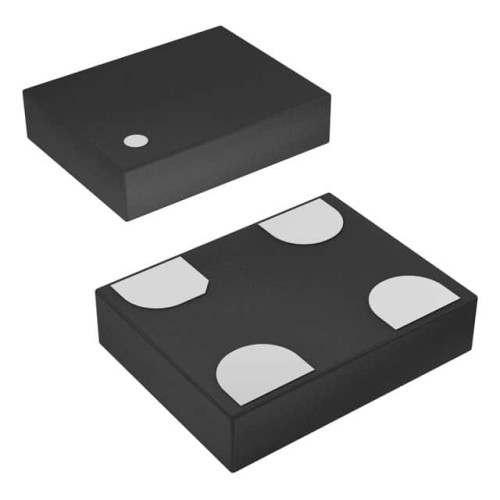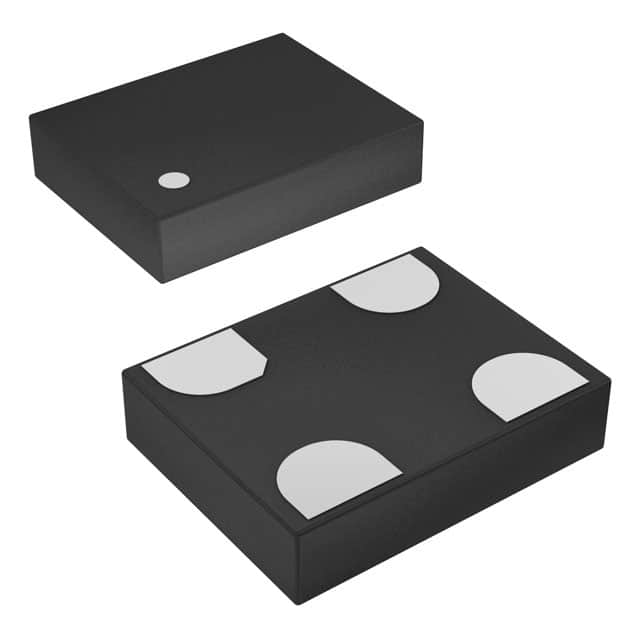
When debugging circuits using the SiTime SIT1602BC-22-28N-66.666000 MEMS oscillator, the most common failure modes are no output, incorrect frequency, excessive jitter, or intermittent startup. The root causes typically fall into three categories: power supply issues, output load mismatches, or PCB layout problems. For example, a frequent complaint is "the oscillator works on a breadboard but fails on the final PCB." This almost always traces back to poor decoupling or excessive trace capacitance. Another classic case is a "dead" oscillator that produces no output, which often results from a reversed power supply connection or a damaged device due to overvoltage.
Your step-by-step debugging methodology should start with the simplest checks. First, verify the power supply voltage at the oscillator's VDD pin using an oscilloscope, not just a multimeter. The SIT1602BC requires 2.25V to 3.63V, and a clean 2.8V nominal is typical for the 2.8V variant. Watch for ripple or droop during startup. Next, confirm the output enable (OE) pin is correctly biased. On this device, the OE pin is active high; leaving it floating can cause unpredictable behavior. If the output is present but at the wrong frequency, check your oscilloscope's timebase and ensure you are not measuring harmonics. For jitter or phase noise issues, switch from a standard 100 MHz scope probe to a low-capacitance active probe to avoid loading the output.
Common mistakes in schematic design include forgetting the output load resistor. The SIT1602BC with H/LV-CMOS output expects a specific load. For a 50 ohm measurement environment, you must add a series resistor (typically 22-33 ohms) right at the output pin to match the transmission line impedance. Without it, you may see ringing or double-triggering on downstream logic. Another frequent error is using a single decoupling capacitor that is too large (e.g., 10 uF) without a smaller 0.1 uF ceramic near the VDD pin. This causes a high-impedance path at high frequencies, leading to supply noise coupling into the oscillator. In PCB layout, the cardinal sin is running the output trace parallel to a noisy digital bus for more than a few millimeters. Keep the oscillator output trace short, direct, and on a ground-referenced layer. Also, never place vias under the oscillator body; this can create mechanical stress and alter the MEMS resonator's frequency.
To verify component authenticity and quality, start by inspecting the package markings. Genuine SiTime SIT1602BC parts have a laser-etched marking that includes the full part number, date code, and a small "S" logo. The package should be a uniform, matte black with no smudges. A common counterfeit indicator is a shiny, glossy surface or markings that look printed rather than etched. Measure the supply current: a genuine device under no load should draw approximately 4.6 mA typical at 2.8V. If you see more than 6 mA, suspect a counterfeit or damaged part. X-ray inspection can reveal internal bond wire differences, but for field use, a simple frequency measurement with a spectrum analyzer is more practical. If the output frequency is stable to within ±25 ppm of 66.6660 MHz at room temperature, the part is likely genuine. Use a calibrated frequency counter with a 10-second gate time for best accuracy.
Essential test equipment includes a digital oscilloscope with at least 200 MHz bandwidth (500 MHz preferred for jitter measurements), a 10x passive probe with <10 pF input capacitance, and a frequency counter with 1 ppm accuracy. For power integrity, use a differential probe or a 50 ohm feed-through terminator on the scope. A spectrum analyzer is invaluable for identifying spurious emissions or phase noise. When measuring the oscillator output, always use a 50 ohm coaxial cable with a series resistor at the oscillator output to avoid reflections. Never probe directly with a ground clip; use a spring-loaded ground tip instead.
Knowing when to suspect the component versus the circuit is a critical skill. Suspect the circuit first if the oscillator works intermittently or only after power cycling. This often indicates a supply sequencing issue, such as the OE pin being asserted before VDD stabilizes. Suspect the component if you have a known-good PCB that fails with one oscillator but works with another, or if the output frequency is consistently off by more than 100 ppm. A classic case: a customer reported a 66.666 MHz oscillator output that was actually 66.666 kHz. This was traced to a counterfeit part where the MEMS die was replaced with a low-frequency quartz resonator. The circuit was fine, but the component was fraudulent.
Real-world case studies provide concrete lessons. In one case, a customer's design for a telecom line card used the SIT1602BC as a reference clock for a PLL. They observed random lock-loss events. Debugging revealed that the oscillator's output had excessive jitter due to a 1 uF electrolytic capacitor placed 2 inches away from the VDD pin. Replacing it with a 0.1 uF ceramic right at the pin and adding a 10 ohm series resistor in the supply trace solved the problem. Another case involved a prototype where the oscillator would not start below 0°C. The root cause was a weak pull-up resistor (100k ohm) on the OE pin, which caused the pin to float near the threshold voltage during cold startup. Changing to a 10k ohm resistor fixed it. A third case: a customer used the oscillator in a battery-powered device and reported premature battery drain. The oscillator was drawing 8 mA instead of the expected 4.6 mA. The cause was a damaged output pin due to ESD during assembly. The lesson: always include a 100 ohm series resistor at the output to limit current during accidental shorts.
In summary, successful debugging of the SiTime SIT1602BC oscillator requires a methodical approach: check power supply quality and decoupling, verify OE pin bias, inspect the output for proper termination, and use appropriate test equipment. Always suspect the surrounding circuit first, but be ready to identify counterfeit or damaged components through careful measurement. By following these practical steps, you can resolve the vast majority of oscillator-related issues in the field.